FAQ
This page covers the most frequently asked questions about Almost Unified.
Does the mod add custom resources or recipes?
No. Almost Unified does not add any items, blocks, recipes, or world generation. It only changes existing content of other mods. If you need a resource that no mod provides, you have to add it with a mod like KubeJS.
Is ore generation unified?
On NeoForge, yes. When the world_gen_unification option of the Startup Config is enabled, ores of variant items are removed from world generation. Read more about this on the World Generation page.
On Fabric, ore generation is not unified. You can enable loot unification instead, so all ores drop the target raw materials, or disable the ore generation of other mods in their configs.
Are fluids unified?
No. Almost Unified only unifies items.
Is mod XY compatible?
Most likely. Almost Unified unifies all JSON recipes that use common property names such as input, ingredients, output, or result. Some mods use unusual recipe structures that require a dedicated recipe unifier. Almost Unified ships with unifiers for a few mods, and mods can also provide their own through the API.
Mods that don't use JSON recipes at all can't be unified. Such mods usually have configs to change their outputs.
For a list of mods that need special treatment, check the Mod Compatibility page. If you feel like a mod should be supported, reach out to us on Discord or use the issue tracker.
Is the unification reloadable?
Yes. The unification runs every time data packs are loaded, which happens when you join a world or run the /reload command. All configs except the Startup Config are read again before each unification, so you can change them while the game is running.
How do I know if something was unified?
Every recipe that was changed by Almost Unified has a small icon in JEI, REI, and EMI. Hovering over it shows whether the recipe was unified and whether it had duplicates. See Recipe Viewers.
For more details, enable the dumps in the Debug Config and check the logs.
Where do I find mod IDs for the config?
Enable advanced tooltips in-game by pressing F3 + H. When you hover over an item, the tooltip shows the item ID. The part before the : is the mod ID.
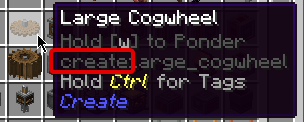
How is the target item chosen?
By the mod_priorities list in the unification config. The mod at the top of the list has the highest priority. For each unification tag, Almost Unified picks the item of the first mod in the list that has an item in the tag.
Mods that are not part of the list are never chosen as the target. If none of the items in a tag belong to a listed mod, the tag is not unified at all.
To use a different mod for a specific tag, add an entry to priority_overrides.
Will unified items become useless?
No. Almost Unified was built with existing worlds in mind. Recipe inputs are converted to tags whenever possible, so variant items that players already have can still be used in recipes. There will be no new way to obtain variant items, though.
How do I unify resources with different tags?
Resources are only unified if they share a unification tag. If mods use different tags for the same resource, for example c:ingots/tin and c:tin_ingots, use tag substitutions to merge them. To add single items to a tag, use custom tags.
Since the unification runs after tags are loaded, you can also change tags with data packs or KubeJS.
Why is a tag not unified?
Check the following:
- The tag has to exist in the game and contain at least one item. Enable
log_invalid_tagsin the Debug Config to see which configured tags are skipped. - At least one item of the tag has to belong to a mod from
mod_priorities. - The tag must not be listed in
ignored_tags. - A tag can only be part of a single unification config. If it is defined in multiple configs, only one of them uses it and a warning is logged.
- Each item can only belong to a single unification tag. If an item is part of multiple tags, an error is logged.
Enable dump_tags in the Debug Config to see all unification tags and their items.
Why are some recipes not unified?
- The recipe type or recipe ID is ignored in the unification config.
- The recipe uses a structure Almost Unified doesn't understand. In this case, a dedicated recipe unifier is needed.
- The recipe is not a JSON recipe.
- On NeoForge, recipes with conditions that are not met are skipped.
A recipe broke after the unification. What can I do?
If a recipe fails to load after it was unified, Almost Unified logs an error that lists the affected recipes. Add the recipe ID to ignored_recipe_ids or the recipe type to ignored_recipe_types of your unification config. If this solves the problem, please report it on the issue tracker so we can improve the support.
Why is a variant item still visible in my recipe viewer?
recipe_viewer_hidingis disabled in the unification config the tag belongs to.- All items of the tag belong to the same mod. Such tags are skipped for hiding.
- The Startup Config has
server_onlyenabled and the client doesn't have Almost Unified installed.
See Recipe Viewers for more details.
Should I ship the debug config with my modpack?
No. The debug options can produce large files and slow down the loading. Almost Unified creates a .gitignore file in its config folder that excludes debug.json, so it's not tracked when you use Git for your modpack.