Block Patterns
Block patterns are a powerful system to check for specific block arrangements around the altar. They can be used to add more depth to rituals by requiring players to build a specific structure around the altar.
NOTE
This page assumes that you know how to get an instance of the altar recipe builder. If you do not know how to do that or you didn't read about the general recipe structure yet, please read the recipe basics page.
General
A block pattern consists of a 3D pattern of blocks. Each PatternEntry has an offset defining its position relative to the altar and a predicate defining which block needs to be present at the specified position. Offsets are defined as [x, y, z] with [0, 0, 0] being the position of the altar. Predicates are created by defining blocks or block tags with optional block state data.
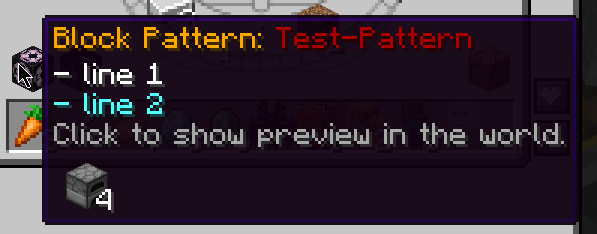
The pattern can have an optional name, which is useful if you want to design multiple tiers of a pattern. Additionally, you can set custom tooltip lines to give more context to the player.
When creating block patterns, the best approach is to think about the standard orientation of the altar. By default, an altar faces the north direction. You should define the pattern in the same way. Place down an altar facing towards the north and build the pattern around it. This way, the pattern will be correctly oriented and you can avoid confusion with the block states.
Patterns are rotation-aware. If you include blocks in your pattern with a required facing direction, you need to ensure that the block states are correctly defined. Blocks that support rotation will automatically be rotated depending on the altar's orientation. For example, if you build a furnace that must face towards the north in the default orientation, it will be rotated to face south if the altar faces south. This way, players don't have to worry about the orientation of the altar when building the pattern.
Pattern Entry
A pattern entry describes a single entry inside the block pattern. As mentioned before, it holds the offset and the predicate. Additionally, it holds an optional string value called the query. This value is used for assigning a search string to multiple entries, which can be used inside events to quickly filter for a specific group of entries instead of checking for each entry separately.
Offsets
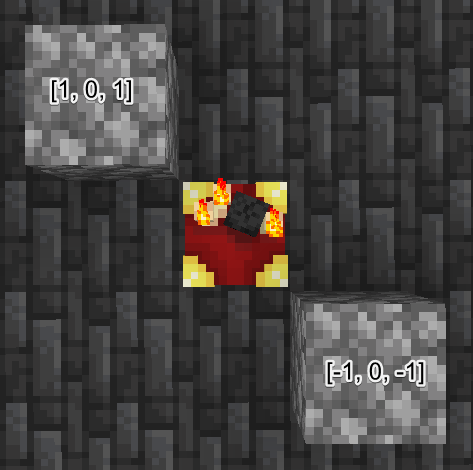
To obtain the correct offset points for your pattern entries, the easiest way is to look at the altar from the top. In this example, the altar faces north.
As you can see, the bottom on the bottom right is at the position [-1, 0, -1] relative to the altar, which is at [0, 0, 0]. This means that the top left corner is at the position [1, 0, 1]. With this information, you can easily obtain the correct offsets for all of the blocks you want to include in the pattern.
An offset must be unique. Only one pattern entry can exist at a specific offset.
Block State
Each pattern entry predicate can specify a required block state. A block state consists of multiple properties, which is a simple map from a property name to a property value. Vanilla uses many block states for various blocks. One of the most common properties is the facing or horizontal facing property, which defines the direction a block is facing.
To obtain your desired block state properties and values, you can use the Minecraft debug screen (activated by pressing F3). When looking at a block, the debug screen shows the block states of that block at the right border. You can then use these properties and values in your pattern entry predicates.
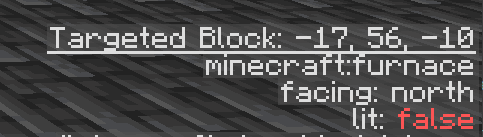
Summoning Rituals will only check for properties that are explicitly defined in the pattern entry. That means if you don't set a specific value or a property, it acts as wildcard and any value for that property will be accepted. For example, if you include a furnace in your pattern but do not care about its orientation, you can simply omit the facing property. This way, the pattern will match regardless of the direction the furnace is facing.
If you don't specify a block state at all, all properties are considered wildcards. This means it just checks for the correct block.
Automatic Generation
Read the sections below to learn how to define a block pattern. However, if you don't want to define it manually, there is an item in the game that allows generating a pattern automatically. It's called the Pattern Generator.
NOTE
This feature is available since version 3.12.0.
The item is not available in the creative inventory. Because it's a dev-only item, you need to obtain it through a command.
/give @p summoningrituals:pattern_generatorAfter obtaining the item, you have to perform the following steps to generate a pattern:
- Select position 1 by right-clicking the block you want to use as the first position.
- Select position 2 by right-clicking the block you want to use as the second position.
- Right-click the Altar block.
The two positions are inclusive. There are a few requirements for the pattern to be generated successfully:
- The Altar block must be facing towards the north.
- Two positions must be selected.
- The Altar must be within the pattern bounds.
You can also sneak-right-click at any time to reset the selected positions. A highlighted box will show the current pattern bounds.
After the pattern has been generated, you can find the output in your Minecraft log file. It is already formatted to be pasted into your recipe script. This only includes the offset positions and the blocks, but not the block states. You can then modify the output as needed to add block states or queries.
Main Block Pattern
The main block pattern acts as a recipe condition. It is required for the ritual to start and is checked after all other conditions have passed. If the pattern does not match, the ritual won't start.
- type:
BlockPatternCondition - required: no
- default: none
- primary access:
blockPattern(...)
Syntax
Because a pattern is a rather complex object, its creation is handled through a builder pattern. You can obtain the instance of the builder by calling the blockPattern function. The builder instance is then passed to a callback where you can define the pattern.
- builder properties:
name- description: specifies the pattern name; useful for patterns that have multiple tiers
- type:
Component - required: no
- default: none
tooltip- description: specifies custom tooltip lines for the pattern; these lines are shown in the recipe viewer when hovering over the pattern icon
- type:
List<Component> - required: no
- default: empty list
entries- description: holds all defined pattern entries
- type:
Set<PatternEntry> - required: yes
- builder functions:
name(Component name)- assigns the given name to the pattern
- you can also use the KubeJS
Textutility binding to create a colored text
tooltip(List<Component> tooltip)- assigns the given tooltip lines to the pattern
- needs to be passed as an array wrapped in
[] - you can also use the KubeJS
Textutility binding to create colored text
block(BlockPos offset, Block block)- creates a new pattern entry with the specified offset and a predicate that checks for the specified block
block(BlockPos offset, Block block, BlockState blockState)- creates a new pattern entry with the specified offset and a predicate that checks for the specified block with the specified block state
queryableBlock(BlockPos offset, Block block, String query)- creates a new pattern entry with the specified offset, a predicate that checks for the specified block, and assigns the specified query to the entry
queryableBlock(BlockPos offset, Block block, BlockState blockState, String query)- creates a new pattern entry with the specified offset, a predicate that checks for the specified block with the specified block state, and assigns the specified query to the entry
tag(BlockPos offset, TagKey<Block> blockTag)- creates a new pattern entry with the specified offset and a predicate that checks for any block in the specified block tag
tag(BlockPos offset, TagKey<Block> blockTag, BlockState blockState)- creates a new pattern entry with the specified offset and a predicate that checks for any block in the specified block tag with the specified block state
queryableTag(BlockPos offset, TagKey<Block> blockTag, String query)- creates a new pattern entry with the specified offset, a predicate that checks for any block in the specified block tag, and assigns the specified query to the entry
queryableTag(BlockPos offset, TagKey<Block> blockTag, BlockState blockState, String query)- creates a new pattern entry with the specified offset, a predicate that checks for any block in the specified block tag with the specified block state, and assigns the specified query to the entry
Example
In this example, we define a pattern with 4 entries. Each entry is a furnace, but they all must face towards the altar in the center. Additionally, the pattern has a colored name and custom tooltip lines.
.blockPattern((pattern) =>
    pattern
    .name(Text.of("Test-Pattern").darkRed())
    .tooltip(["- line 1", Text.of("- line 2").aqua()])
    .block([0, 0, 2], "furnace", { facing: "north" })
    .block([-2, 0, 0], "furnace", { facing: "east" })
    .block([0, 0, -2], "furnace", { facing: "south" })
    .block([2, 0, 0], "furnace", { facing: "west" })
)
Block Pattern Extension
Contrary to the main block pattern, a block pattern extension is not required for the ritual to start. It acts as an additional check that can be used in events to add extra outputs or effects when the pattern is matched. If you do not use events, this pattern won't have any effect on the ritual at all.
A block pattern extension can only be defined if a main block pattern exists. It uses the same syntax and functions as the main block pattern, but it is accessed via the blockPatternExtension function instead of the blockPattern function.
Obtaining the information whether the block pattern extension was matched is exposed in the summoning events. Please refer to the events page for more information about how to use this in events.